


alle auf exactFillRootNode
BILD: https://ibb.co/S4mCVvXq
alle auf exactFillRootNode
BILD: https://ibb.co/S4mCVvXq
dafür brauchst du drei Triggers
exactFillRootNodeFuel
exactFillRootNodeAdditives
exactFillRootNodeAdditives
<fillUnit>
<fillUnitConfigurations title="$l10n_configuration_Bunker">
<fillUnitConfiguration name="$l10n_configuration_yesBunker" price="0">
<fillUnits>
<fillUnit unitTextOverride="$l10n_unit_literShort" fillTypeCategories="forageHarvester"capacity="30000">
<alarmTriggers>
<alarmTrigger minFillLevel="0.95" maxFillLevel="1" needsTurnOn="true">
<alarmSound template="rollbeltAlarm" volumeScale="2" linkNode="E281_main_comp" />
</alarmTrigger>
<alarmTrigger minFillLevel="1" maxFillLevel="1" turnOffInTrigger="true"/>
</alarmTriggers>
</fillUnit>
<fillUnit unitTextOverride="$l10n_unit_literShort" showOnHud="false" showInShop="false" fillTypes="diesel" capacity="1500" >
<exactFillRootNode node="exactFillRootNodeFuel" />
</fillUnit>
<fillUnit unitTextOverride="$l10n_unit_literShort" showOnHud="false" showInShop="false" showOnInfoHud="false" fillTypes="def" capacity="130" />
<fillUnit unitTextOverride="$l10n_unit_literShort" fillTypes="SILAGE_ADDITIVE" capacity="120" uiPrecision="2">
<exactFillRootNode node="exactFillRootNodeAdditives" />
</fillUnit>
</fillUnits>
<objectChange node="exactFillRootNodeAdditives" visibilityActive="true" visibilityInactive="false" />
</fillUnitConfiguration>
</fillUnitConfigurations>
</fillUnit>
Bild: https://ibb.co/7JMnnR4b
die must dir auseinem mod nehmen
alles was eine collisions hat must du auf VEHICLE einstellen .
Bild: https://ibb.co/JjXL0VQz
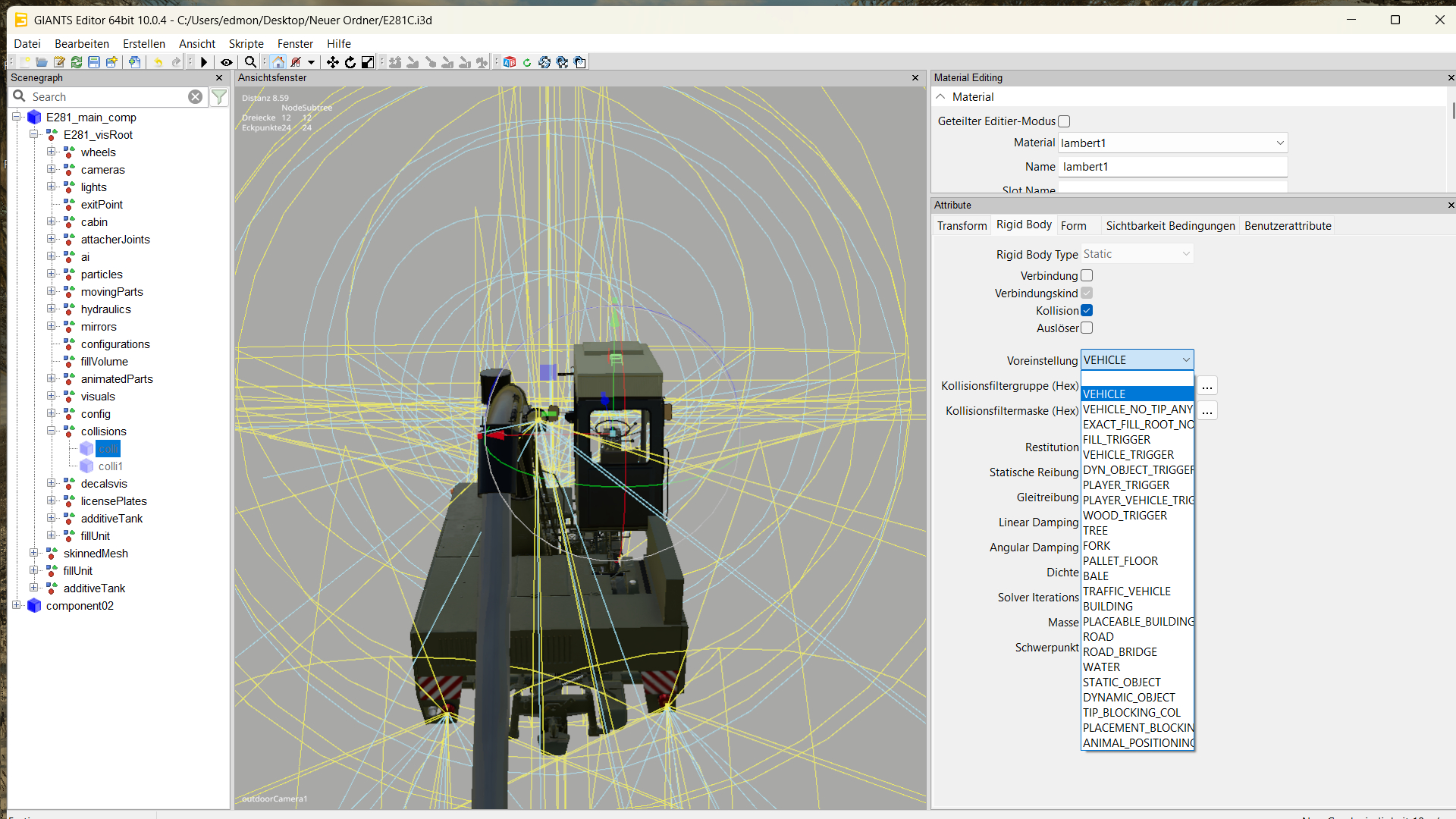
bei der Rul eine Transform Group erstellen und in der xml eintragen
<beaconLights>
<beaconLight node="beaconLight1" speed="0.015" filename="$data/shared/assets/beaconLights/lizard/beaconLight02.xml"/>
</beaconLights>
<i3dMappings>
<i3dMapping id="beaconLight1" node="0>0|2|2|0"/>
</i3dMappings>
Bild: https://ibb.co/DHMGQjhB
du must in der i3d den trailerTigger bei Rigid Body auf Fill_Tigger stellen .
Bild : https://ibb.co/gLbpHdJL
kann geschlossen werden ,habe ihn mit Farbwahl
nim einfach aus der Filebase einen 7030 Series und dort nimmst du es aus der i3d
du hast ja nur den TH_PFConfigurartor 1.0.0.1 gehabt und der war veraltet 
den DL_Link von dir den du reingestelthast
meinst du so wie auf dem bild , das es bei dir nicht angezeigt wird ,wenn ja dan ist es die modDesc.xml vom PFConfigurator . die lösung ist aber einfach : nimm die modDesc.xml aus dem TUT ,der DL ist unten .
Bild : https://ibb.co/bMBvfmhR
schau mal

habe es hinbekommen , kann geschlossen werden


<fillUnit>
<fillUnitConfigurations title="$l10n_fillType_diesel">
<fillUnitConfiguration name="$l10n_configuration_valueDefault" price="0">
<fillUnits>
<fillUnit unitTextOverride="$l10n_unit_literShort" showOnHud="false" showInShop="false" fillTypes="diesel" capacity="450">
<dashboard displayType="ROT" valueType="fillLevel" node="oilPressureAir" minRot="0" maxRot="-75" rotAxis="3" doInterpolation="true" interpolationSpeed="1.3" groups="MOTOR_ACTIVE"/>
<exactFillRootNode node="exactFillRootNodeFuel"/>
</fillUnit>
<fillUnit unitTextOverride="$l10n_unit_literShort" showOnHud="false" showInShop="false" showOnInfoHud="false" fillTypes="air" capacity="2500">
</fillUnit>
</fillUnits>
<objectChange node="gasCanisterVis1_point" visibilityActive="false" visibilityInactive="true"/>
<objectChange node="gasCanisterVis2_point" visibilityActive="false" visibilityInactive="true"/>
<objectChange node="gasCanisterVis3_point" visibilityActive="false" visibilityInactive="true"/>
</fillUnitConfiguration>
<fillUnitConfiguration name="$l10n_configuration_capacityX" params="+20" price="25">
<fillUnits>
<fillUnit unitTextOverride="$l10n_unit_literShort" showOnHud="false" showInShop="false" fillTypes="diesel" capacity="470">
<dashboard displayType="ROT" valueType="fillLevel" node="oilPressureAir" minRot="0" maxRot="-75" rotAxis="3" doInterpolation="true" interpolationSpeed="1.3" groups="MOTOR_ACTIVE"/>
<exactFillRootNode node="exactFillRootNodeFuel"/>
</fillUnit>
<fillUnit unitTextOverride="$l10n_unit_literShort" showOnHud="false" showInShop="false" showOnInfoHud="false" fillTypes="air" capacity="2500">
</fillUnit>
</fillUnits>
<objectChange node="gasCanisterVis1_point" visibilityActive="true" visibilityInactive="false"/>
<objectChange node="gasCanisterVis2_point" visibilityActive="false" visibilityInactive="true"/>
<objectChange node="gasCanisterVis3_point" visibilityActive="false" visibilityInactive="true"/>
</fillUnitConfiguration>
<fillUnitConfiguration name="$l10n_configuration_capacityX" params="+40" price="50">
<fillUnits>
<fillUnit unitTextOverride="$l10n_unit_literShort" showOnHud="false" showInShop="false" fillTypes="diesel" capacity="490">
<dashboard displayType="ROT" valueType="fillLevel" node="oilPressureAir" minRot="0" maxRot="-75" rotAxis="3" doInterpolation="true" interpolationSpeed="1.3" groups="MOTOR_ACTIVE"/>
<exactFillRootNode node="exactFillRootNodeFuel"/>
</fillUnit>
<fillUnit unitTextOverride="$l10n_unit_literShort" showOnHud="false" showInShop="false" showOnInfoHud="false" fillTypes="air" capacity="2500">
</fillUnit>
</fillUnits>
<objectChange node="gasCanisterVis1_point" visibilityActive="true" visibilityInactive="false"/>
<objectChange node="gasCanisterVis2_point" visibilityActive="true" visibilityInactive="false"/>
<objectChange node="gasCanisterVis3_point" visibilityActive="false" visibilityInactive="true"/>
</fillUnitConfiguration>
<fillUnitConfiguration name="$l10n_configuration_capacityX" params="+60" price="75">
<fillUnits>
<fillUnit unitTextOverride="$l10n_unit_literShort" showOnHud="false" showInShop="false" fillTypes="diesel" capacity="510">
<dashboard displayType="ROT" valueType="fillLevel" node="oilPressureAir" minRot="0" maxRot="-75" rotAxis="3" doInterpolation="true" interpolationSpeed="1.3" groups="MOTOR_ACTIVE"/>
<exactFillRootNode node="exactFillRootNodeFuel"/>
</fillUnit>
<fillUnit unitTextOverride="$l10n_unit_literShort" showOnHud="false" showInShop="false" showOnInfoHud="false" fillTypes="air" capacity="2500">
</fillUnit>
</fillUnits>
<objectChange node="gasCanisterVis1_point" visibilityActive="true" visibilityInactive="false"/>
<objectChange node="gasCanisterVis2_point" visibilityActive="true" visibilityInactive="false"/>
<objectChange node="gasCanisterVis3_point" visibilityActive="true" visibilityInactive="false"/>
</fillUnitConfiguration>
</fillUnitConfigurations>
</fillUnit>
danke das geht schon aber nun hat er keine tankanzeige
Log warning :
Unknown fillUnit '1' for consumer 'vehicle.motorized.consumerConfigurations.consumerConfiguration(0).consumer(0)'
Unknown fillUnit '2' for consumer 'vehicle.motorized.consumerConfigurations.consumerConfiguration(0).consumer(1)'
<motorized>
<consumerConfigurations>
<consumerConfiguration>
<consumer fillUnitIndex="1" usage="150" fillType="diesel"/>
<consumer fillUnitIndex="2" usage="150" fillType="air" permanentConsumption="false" refillLitersPerSecond="350" refillCapacityPercentage="0.5"/>
</consumerConfiguration>
<consumerConfiguration>
<consumer fillUnitIndex="1" usage="190" fillType="diesel"/>
<consumer fillUnitIndex="2" usage="150" fillType="air" permanentConsumption="false" refillLitersPerSecond="350" refillCapacityPercentage="0.5"/>
</consumerConfiguration>
<consumerConfiguration>
<consumer fillUnitIndex="1" usage="230" fillType="diesel"/>
<consumer fillUnitIndex="2" usage="150" fillType="air" permanentConsumption="false" refillLitersPerSecond="350" refillCapacityPercentage="0.5"/>
</consumerConfiguration>
<consumerConfiguration>
<consumer fillUnitIndex="1" usage="270" fillType="diesel"/>
<consumer fillUnitIndex="2" usage="150" fillType="air" permanentConsumption="false" refillLitersPerSecond="350" refillCapacityPercentage="0.5"/>
</consumerConfiguration>
</consumerConfigurations>
Bild: https://ibb.co/NdXVCXH2
 Alles anzeigen
Da hilft leider nur exaktes und systematisches Vorgehen. Ordne doch erstmal Deine ganzen fillUnits. Das sind wegen der configs und der object changes ja etliche. Wenn Du die .xml mit Notepad++ öffnest werden Dir jeweils der Anfang und das Ende der tags angezeigt. Das sieht ja dann so aus wie eine mathematische Formel mit etlichen Klammern.
Jede neue fillUnit beginnt mit bei Dir mit "<fillUnit unitunitTextOverride ..."
Überall da, wo Du als fillUnit "diesel" hast, brauchst Du einen exactFillRootNode, also wegen der configs gleich mehrfach. Jede fillUnit endet mit "</fillUnit>".
Dann kommt die nächste fillUnit (bei Dir "air"), die auch wieder mit "<fillUnit unitunitTextOverride ..." beginnt und mit "</fillUnit>" abgeschlossen werden muss usw. Bei der nächsten config mit Diesel brauchst Du dann wieder eine exactFillRootNode.
Das Ganze muss dann, nachdem Du alle fillUnits so abgearbeitet hast, mit den tags, die ja schon hast, abgeschlossen werden:
</fillUnits>
<objectChange node="gasCanisterVis1_point" visibilityActive="true" visibilityInactive="false"/>
<objectChange node="gasCanisterVis2_point" visibilityActive="true" visibilityInactive="false"/>
<objectChange node="gasCanisterVis3_point" visibilityActive="true" visibilityInactive="false"/>
</fillUnitConfiguration>
</fillUnitConfigurations>
</fillUnit>
danke für ihre mühe , aber ich bin zu blöde dazu und bekomme es nicht hin .
komme immer bis hir was kommt jetzt unter <exactFillRootNode node="0>10" /> ?
<fillUnit>
<fillUnitConfigurations title="$l10n_fillType_diesel">
<fillUnitConfiguration name="$l10n_configuration_valueDefault" price="0">
<fillUnits>
<fillUnit unitunitTextOverride="$l10n_unit_literShort" showOnHud="false" showInShop="false" fillTypes="diesel" capacity="450"/>
<exactFillRootNode node="0>10" />
<fillUnit unitTextOverride="$l10n_unit_literShort" showOnHud="false" showInShop="false" showOnInfoHud="false" fillTypes="air" capacity="2500">
<dashboard displayType="ROT" valueType="fillLevel" node="oilPressureAir" minRot="0" maxRot="-75" rotAxis="3" doInterpolation="true" interpolationSpeed="1.3" groups="MOTOR_ACTIVE"/>
</fillUnit>
</fillUnits>
</fillUnitConfiguration>
<fillUnitConfiguration name="$l10n_configuration_capacityX" params="+20" price="25">
<fillUnits>
<fillUnit unitunitTextOverride="$l10n_unit_literShort" showOnHud="false" showInShop="false" fillTypes="diesel" capacity="470"/>
<exactFillRootNode node="0>10" />
<fillUnit unitTextOverride="$l10n_unit_literShort" showOnHud="false" showInShop="false" showOnInfoHud="false" fillTypes="air" capacity="2500">
<dashboard displayType="ROT" valueType="fillLevel" node="oilPressureAir" minRot="0" maxRot="-75" rotAxis="3" doInterpolation="true" interpolationSpeed="1.3" groups="MOTOR_ACTIVE"/>
</fillUnit>
</fillUnits>
</fillUnitConfiguration>
<fillUnitConfiguration name="$l10n_configuration_capacityX" params="+40" price="50">
<fillUnits>
<fillUnit unitunitTextOverride="$l10n_unit_literShort" showOnHud="false" showInShop="false" fillTypes="diesel" capacity="490"/>
<exactFillRootNode node="0>10" />
<fillUnit unitTextOverride="$l10n_unit_literShort" showOnHud="false" showInShop="false" showOnInfoHud="false" fillTypes="air" capacity="2500">
<dashboard displayType="ROT" valueType="fillLevel" node="oilPressureAir" minRot="0" maxRot="-75" rotAxis="3" doInterpolation="true" interpolationSpeed="1.3" groups="MOTOR_ACTIVE"/>
</fillUnit>
</fillUnits>
</fillUnitConfiguration>
<fillUnitConfiguration name="$l10n_configuration_capacityX" params="+60" price="75">
<fillUnits>
<fillUnit unitunitTextOverride="$l10n_unit_literShort" showOnHud="false" showInShop="false" fillTypes="diesel" capacity="510"/>
<exactFillRootNode node="0>10" />
<fillUnit unitTextOverride="$l10n_unit_literShort" showOnHud="false" showInShop="false" showOnInfoHud="false" fillTypes="air" capacity="2500">
<dashboard displayType="ROT" valueType="fillLevel" node="oilPressureAir" minRot="0" maxRot="-75" rotAxis="3" doInterpolation="true" interpolationSpeed="1.3" groups="MOTOR_ACTIVE"/>
</fillUnit>
</fillUnits>
<objectChange node="gasCanisterVis1_point" visibilityActive="true" visibilityInactive="false"/>
<objectChange node="gasCanisterVis2_point" visibilityActive="true" visibilityInactive="false"/>
<objectChange node="gasCanisterVis3_point" visibilityActive="true" visibilityInactive="false"/>
</fillUnitConfiguration>
</fillUnitConfigurations>
</fillUnit>
Alles anzeigenDu musst für jeden filltype eine eigene fillUnit eintragen. Bei Dir sind Diesel, air und oilPressureAir zusammengefasst.
Korrekt wäre es so:
<fillUnit unitunitTextOverride="$l10n_unit_literShort" showOnHud="false" showInShop="false" fillTypes="diesel" capacity="490"/>
<exactFillRootNode node="exactFillRootNode"/>
</fillUnit>und dann das ganze mit den anderen fillUnits (ohne exactFillRootNode) analog.
Hier mal ein Beispiel:
<fillUnit>
<fillUnitConfigurations>
<fillUnitConfiguration>
<fillUnits>
<fillUnit capacity="8000" fillTypeCategories="combine" foldMaxLimit="1" foldMinLimit="1" unitTextOverride="$l10n_unit_literShort">
<exactFillRootNode node="exactFillRootNode" />
<alarmTriggers>
<alarmTrigger maxFillLevel="1" minFillLevel="1" turnOffInTrigger="true" />
</alarmTriggers>
<dashboard displayType="VISIBILITY" groups="MOTOR_ACTIVE" node="visszajelzo01_on" valueType="fillLevelWarning" warningThresholdMin="7000" />
</fillUnit>
<fillUnit capacity="600" fillTypes="diesel" showInShop="false" showOnHud="false" unitTextOverride="$l10n_unit_literShort">
<exactFillRootNode node="0>1|14" />
<dashboard animName="fuelDisplay" displayType="ANIMATION" groups="MOTOR_ACTIVE" valueType="fillLevel" />
</fillUnit>
<fillUnit capacity="110" fillTypes="def" showInShop="false" showOnHud="false" showOnInfoHud="false" unitTextOverride="$l10n_unit_literShort">
</fillUnit>
</fillUnits>
</fillUnitConfiguration>
</fillUnitConfigurations>
</fillUnit>
ich bekomme es leider nicht hin 
hallo
ich habe meinen <fillUnit> eintrag in der xml geändert und nun bekomme ich in der log die warnung Missing exactFillRootNode for fuel fill unit (1)
die betankung geht aber . 

hir der eintrag in der xml :
<fillUnit>
<fillUnitConfigurations title="$l10n_fillType_diesel">
<fillUnitConfiguration name="$l10n_configuration_valueDefault" price="0">
<fillUnits>
<fillUnit unitunitTextOverride="$l10n_unit_literShort" showOnHud="false" showInShop="false" fillTypes="diesel" capacity="450"/>
<fillUnit unitTextOverride="$l10n_unit_literShort" showOnHud="false" showInShop="false" showOnInfoHud="false" fillTypes="air" capacity="2500">
<dashboard displayType="ROT" valueType="fillLevel" node="oilPressureAir" minRot="0" maxRot="-75" rotAxis="3" doInterpolation="true" interpolationSpeed="1.3" groups="MOTOR_ACTIVE"/>
<exactFillRootNode node="exactFillRootNode"/>
</fillUnit>
</fillUnits>
<objectChange node="gasCanisterVis1_point" visibilityActive="false" visibilityInactive="true"/>
<objectChange node="gasCanisterVis2_point" visibilityActive="false" visibilityInactive="true"/>
<objectChange node="gasCanisterVis3_point" visibilityActive="false" visibilityInactive="true"/>
</fillUnitConfiguration>
<fillUnitConfiguration name="$l10n_configuration_capacityX" params="+20" price="25">
<fillUnits>
<fillUnit unitunitTextOverride="$l10n_unit_literShort" showOnHud="false" showInShop="false" fillTypes="diesel" capacity="470"/>
<fillUnit unitTextOverride="$l10n_unit_literShort" showOnHud="false" showInShop="false" showOnInfoHud="false" fillTypes="air" capacity="2500">
<dashboard displayType="ROT" valueType="fillLevel" node="oilPressureAir" minRot="0" maxRot="-75" rotAxis="3" doInterpolation="true" interpolationSpeed="1.3" groups="MOTOR_ACTIVE"/>
<exactFillRootNode node="exactFillRootNode"/>
</fillUnit>
</fillUnits>
<objectChange node="gasCanisterVis1_point" visibilityActive="true" visibilityInactive="false"/>
<objectChange node="gasCanisterVis2_point" visibilityActive="false" visibilityInactive="true"/>
<objectChange node="gasCanisterVis3_point" visibilityActive="false" visibilityInactive="true"/>
</fillUnitConfiguration>
<fillUnitConfiguration name="$l10n_configuration_capacityX" params="+40" price="50">
<fillUnits>
<fillUnit unitunitTextOverride="$l10n_unit_literShort" showOnHud="false" showInShop="false" fillTypes="diesel" capacity="490"/>
<fillUnit unitTextOverride="$l10n_unit_literShort" showOnHud="false" showInShop="false" showOnInfoHud="false" fillTypes="air" capacity="2500">
<dashboard displayType="ROT" valueType="fillLevel" node="oilPressureAir" minRot="0" maxRot="-75" rotAxis="3" doInterpolation="true" interpolationSpeed="1.3" groups="MOTOR_ACTIVE"/>
<exactFillRootNode node="exactFillRootNode"/>
</fillUnit>
</fillUnits>
<objectChange node="gasCanisterVis1_point" visibilityActive="true" visibilityInactive="false"/>
<objectChange node="gasCanisterVis2_point" visibilityActive="true" visibilityInactive="false"/>
<objectChange node="gasCanisterVis3_point" visibilityActive="false" visibilityInactive="true"/>
</fillUnitConfiguration>
<fillUnitConfiguration name="$l10n_configuration_capacityX" params="+60" price="75">
<fillUnits>
<fillUnit unitunitTextOverride="$l10n_unit_literShort" showOnHud="false" showInShop="false" fillTypes="diesel" capacity="510"/>
<fillUnit unitTextOverride="$l10n_unit_literShort" showOnHud="false" showInShop="false" showOnInfoHud="false" fillTypes="air" capacity="2500">
<dashboard displayType="ROT" valueType="fillLevel" node="oilPressureAir" minRot="0" maxRot="-75" rotAxis="3" doInterpolation="true" interpolationSpeed="1.3" groups="MOTOR_ACTIVE"/>
<exactFillRootNode node="exactFillRootNode"/>
</fillUnit>
</fillUnits>
<objectChange node="gasCanisterVis1_point" visibilityActive="true" visibilityInactive="false"/>
<objectChange node="gasCanisterVis2_point" visibilityActive="true" visibilityInactive="false"/>
<objectChange node="gasCanisterVis3_point" visibilityActive="true" visibilityInactive="false"/>
</fillUnitConfiguration>
</fillUnitConfigurations>
</fillUnit>
geht bei mir mit der taste F nach 3x druck an
<high>
<light node="workLightSideLeft" lightTypes="2"/>
</high>
könnte mir bitte jemand den FS22_Kuhn_TF1512_Hose_Holder_Prefab mit Farbwahl machen für LS25 , ich bekomme das nicht hin ?
<fillUnits>
<fillUnit shopDisplayUnit="CUBICMETER" fillTypeCategories="LIQUID SPRAYER SLURRYTANK" capacity="10000">
geht auch
bei mir geht er auch mit dem FS25_enhancedFillTypeCategories,keine probleme 
